
Windows Broke My TEL → WhatsApp Links (So I Built a Router)

A few months ago, Windows broke something I didn’t even realize I’d come to depend on.
I’m in Indonesia. WhatsApp is where business happens. SMS is mostly spam. And when I’m working on a laptop all day—Notion, HR apps, job boards, CRMs—I want one simple thing:
When I click a phone number, I want WhatsApp Desktop to open. Not a dialer. Not Teams. Not “pick an app.” Just… WhatsApp.
For a while, Windows let me do exactly that. Then an update landed, and suddenly every tel: link started behaving like it had forgotten who I was.
And that’s how win-link-router was born.
TL/DR: Windows tightened protocol-handling rules. WhatsApp doesn’t declare support for tel: links, so Windows won’t let you route tel: directly to WhatsApp anymore. win-link-router fills the gap by becoming the official handler for tel: and then forwarding the link to WhatsApp (desktop first, web fallback), based on your rules.
The Back Story: Why It Stopped Working
If you’re not a developer, the key concept is this: links aren’t just “web links.”
Under the hood, links look like:
https://example.com
mailto:someone@example.com
tel:+15551234567
That part before the colon is the protocol (or “scheme”). It tells Windows what kind of thing this link is, and what kind of app should open it.
Historically, Windows was pretty permissive. If you wanted to set the default app for TEL to something unexpected, you often could.
But Windows has been moving toward a stricter model: apps must declare which protocols they support, and Windows controls default-assignment tightly (for good reasons—security, hijacking prevention, consistency, etc.).
Here’s the kicker:
- WhatsApp supports
whatsapp:links (obviously). - WhatsApp does not declare support for
tel:links. - Therefore Windows won’t let you “cheat” anymore by assigning
tel:to WhatsApp.
Could WhatsApp support tel:? Absolutely. They just don’t.
So when Windows tightened the rules, my TEL → WhatsApp Desktop setup died.
The Problem in Human Terms
A bunch of everyday apps generate phone links as tel::
- Notion
- Job boards / ATS systems
- CRMs
- HR platforms
- Email signatures
- Internal wikis
- Basically anything that wants “click-to-call”
But in the WhatsApp world, what you actually want is:
- “Open WhatsApp and start (or resume) a chat with this number.”
That’s not a tel: link. It’s either:
whatsapp://send?phone=...(native app protocol)https://wa.me/...(web fallback)
So we need a translator. A router.
Introducing: win-link-router
win-link-router is a small Windows desktop app that sits between Windows and the apps you actually want to use.
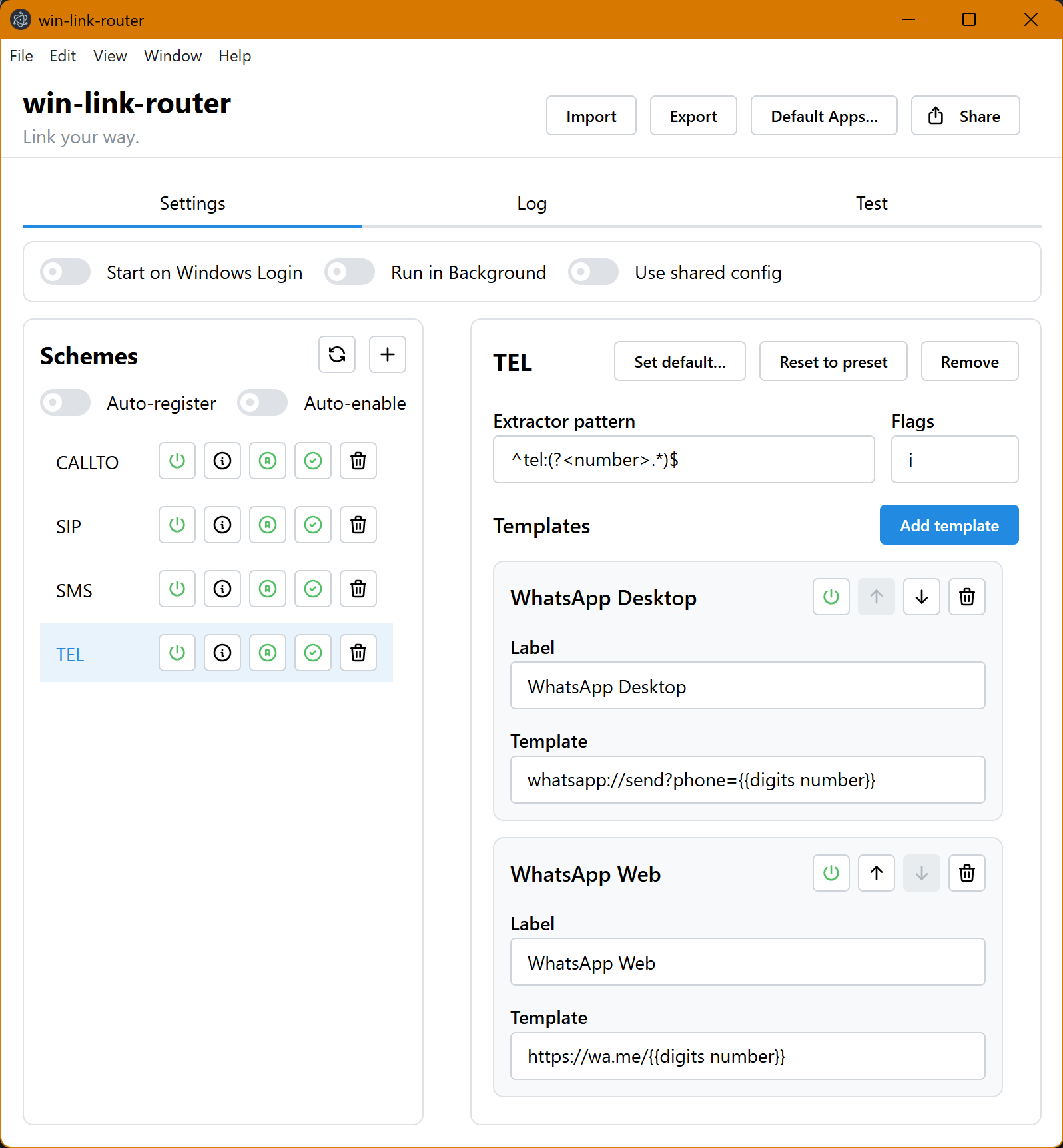
You set win-link-router as the default handler for tel: (and any other schemes you care about). Then you configure rules like:
- If the user clicks
tel:+15551234567 - Extract the number
- Try to open WhatsApp Desktop first
- If that fails, open WhatsApp Web
- If that fails, show the UI and tell me exactly why
It’s not “magic”. It’s explicit, resilient routing.
Use Cases (Beyond TEL)
Once you have a router, you start noticing other “broken glue” in your workflow:
sip:/callto:links that should open a specific VoIP appsms:links that should open WhatsApp (or a web service)- Custom internal link schemes you use in tools or documentation
- “I want this protocol to open that app, but with a transformed URL”
win-link-router is intentionally generic: any scheme → any target via templates.
How It Works (Mental Model)
win-link-router is configured per scheme (protocol):
- Extractor (regex) runs against the full incoming URI (
tel:+1 (555) ...). - Named capture groups become variables.
- Templates are tried in order (fallbacks):
- Render a target (Handlebars template)
- Ask Windows to open it
- If opening fails, try the next template
- If nothing works, win-link-router opens its UI and shows diagnostics.
This is the difference between “I hope Windows figures it out” and “I told Windows exactly what to do.”
Installation
- Go to the win-link-router releases page.
- Download the latest Windows installer.
- Run it.
That’s it!
Quick Start: Reconnect TEL → WhatsApp
- Open win-link-router.
- On first run, choose the TEL WhatsApp preset (or add
TELlater). - Go to Settings → Schemes and ensure
TELis:- Enabled
- Registered
- Click Set default… for
TEL(or use the Default Apps… button in the header). - In Windows Default Apps, set win-link-router as the default handler for
tel:links. -
Paste a test link into the Test tab:
tel:+1 (555) 123-4567 - Confirm the rendered targets look right (desktop first, web fallback).
- Click a phone link from Notion / your browser / your HR tool. You’re back in business!
Bonus: Run in Background (Tray)
There’s a bit of a delay when you click a link. Usually well under a second, but it can be more on older machines. If linking takes too long, enable:
- Run in Background (tray icon)
- Optional: Start on Windows Login
This keeps the router ready to catch links without wasting time launching on every link.
Why This Isn’t “Just Another Utility”
When a few commenters asked what to do after Windows broke the old method, I went looking for something that:
- Didn’t require registry voodoo or unsafe hacks
- Didn’t try to “force defaults” (Windows fights you for a reason)
- Could be configured, debugged, and trusted
- Had sensible fallbacks and diagnostics
I didn’t find it.
So I built it.
And here’s the part that surprised me: once I had the right workflow, I got it into production in three days.
The Tool That Made It Possible: STAN
I’m not shy about using AI tooling, but I’m also allergic to “vibe coding” that leaves you with:
- a pile of untested code
- implicit behavior
- flaky edge cases
- brittle Windows integration
- “works on my machine” release pipelines
- and a future version of you who hates past-you
That’s why I built STAN (and why I use it for projects like this).
STAN isn’t a chatbot. It’s a design-and-code-quality-focused assistant workflow that enforces a few simple but powerful habits:
- Design first (requirements, architecture, contracts)
- Services-first structure (logic separated from side effects)
- Tests alongside real logic (not as an afterthought)
- Strict TypeScript and linting to prevent “mystery code”
- Small, maintainable modules instead of sprawling files
- Change discipline: you always know what changed, why, and how it’s validated
That matters a lot when you’re doing things like:
- Windows registry integration
- protocol handling edge cases
- tray lifecycle behavior
- packaging and release automation
- and debugging user environments you don’t control
win-link-router isn’t perfect (nothing is), but it’s not a “demo that accidentally shipped.” It’s a real tool, built like a real tool.
Try It: Fix Your Workflow (and Maybe Your Toolchain)
If you live in Notion (or any app that emits tel: links) and you want those links to open WhatsApp again:
- Try win-link-router
- And if you’re building your own tools—especially small utilities that touch OS behavior—try STAN
If you’ve ever shipped a “quick fix” that turned into a maintenance burden, STAN is my attempt at a better alternative: AI-assisted development that cares about design, correctness, and long-term code health, not just getting something to run.
And if you have a protocol-routing pain point that isn’t tel:—I’d love to hear it. Once you have a router, you start seeing opportunities everywhere!






Leave a comment