
Welcome to DevOps Hell. Here’s Your Map.
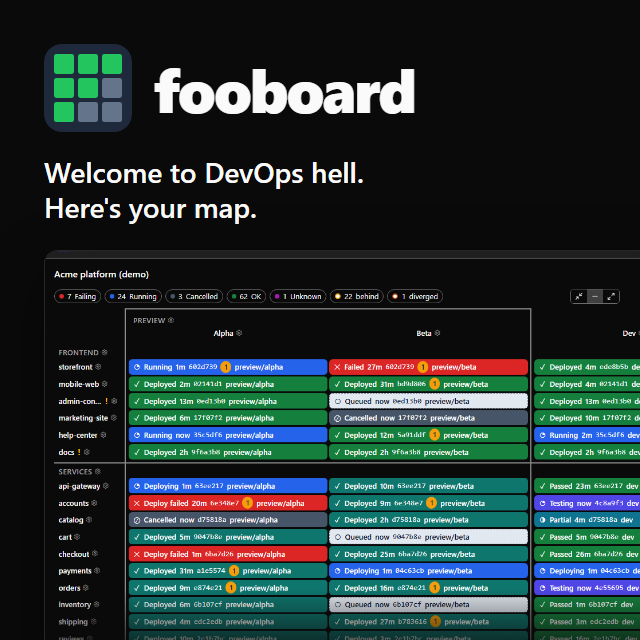
Every team that ships more than a couple of repos ends up asking the same question several times a day: what is actually deployed where?
Which commit of the API is on staging? Did last night’s prod deploy of the web app go through, or is it still sitting on Tuesday’s build? Is the release branch behind dev, or did somebody hotfix prod and leave everything else to drift?
The answers all exist. They’re scattered across a dozen GitHub Actions tabs and an AWS console or two, and nobody wants to click through all of them before standup.
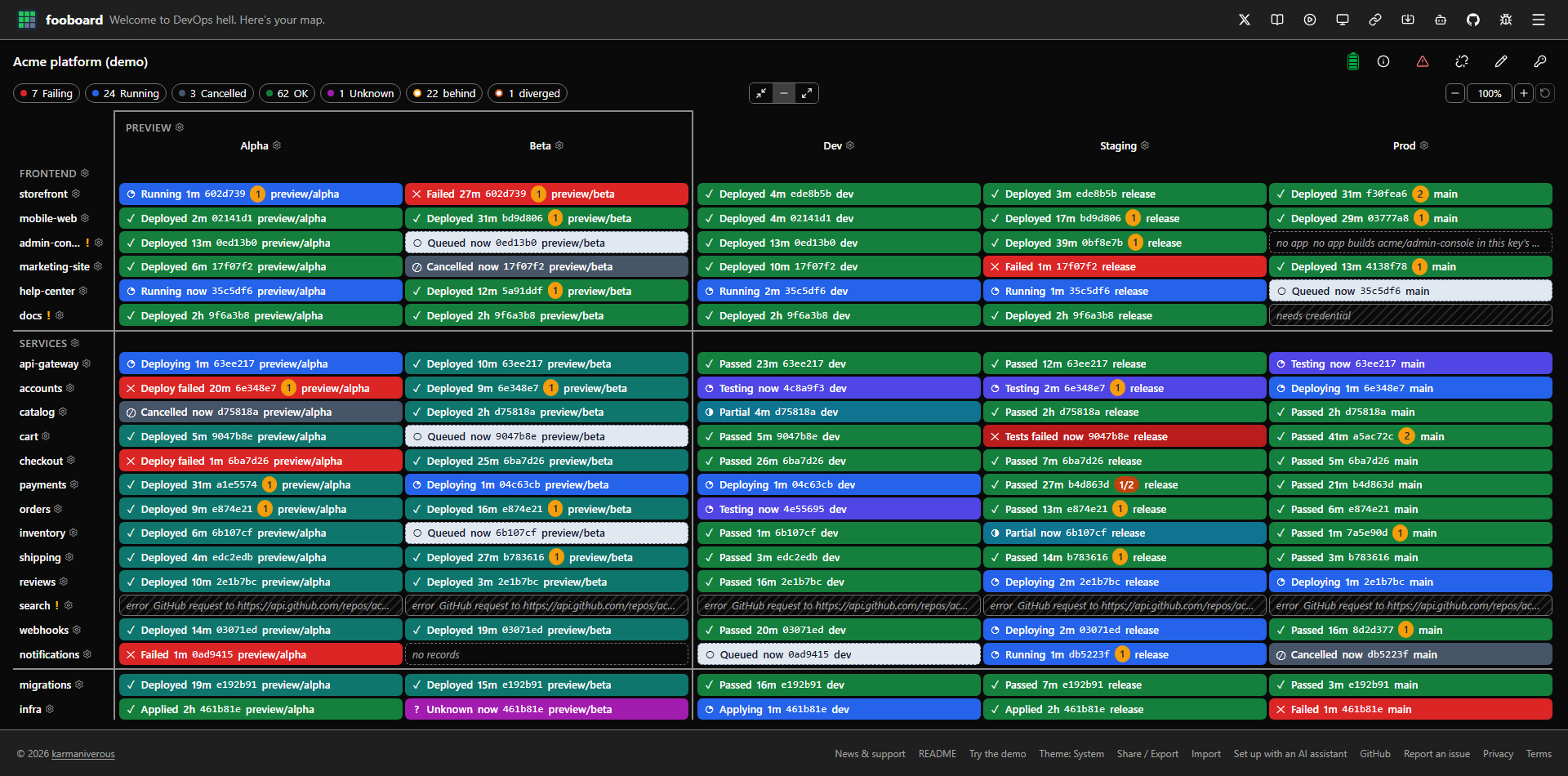
So I built fooboard: a deployment status board that runs entirely in your browser. Repos are rows, stages are columns, and every cell tells you what’s deployed there and whether it’s running, failed, behind or diverged.
TL/DR: fooboard reads your GitHub Actions runs and AWS Amplify jobs directly from your browser, with your own read-only credentials. No backend, no accounts, no cookies, no analytics, no third-party scripts. Try the live demo (simulated data, no token needed), or point your AI assistant at fooboard.dev/ai and let it build your board. It never sees your keys. The code is on GitHub under BSD-3-Clause.
The Spreadsheet That Kept Rotting
Before fooboard there was a spreadsheet.
It was a perfectly respectable Google Sheet. GitHub Actions and Amplify fired webhooks at Zapier, Zapier upserted a row per repo and stage, and a dashboard tab painted a colour-coded grid. A formula marked a stage stale when its source stage had been updated more recently than it had.
It proved the idea. It also taught me everything that’s wrong with doing it that way:
- Time is a lousy proxy for state. “Updated more recently” is noisy, and it misses hotfixes completely. A hotfix lands on prod, prod is now newer than staging, and the sheet cheerfully reports that all is well.
- Hand-maintained rows drift. Repos get retired and leave orphans behind. Branch naming changes and the mapping quietly stops matching.
- Silent failures hide data. When a webhook didn’t map to a row, nothing said so. The cell just stopped changing, and a cell that stops changing looks exactly like a cell that’s fine.
So fooboard asks git instead of the clock. A cell gets a behind badge (with a count) when its branch is missing commits from the stage it’s promoted from, and a diverged badge when it also has commits the source lacks. Either badge links to GitHub’s compare page. And every run that lands in no cell shows up under Unmapped runs, with a fix for each, instead of vanishing.
Why No Backend
The obvious way to build this is a little service: hold everyone’s tokens, poll GitHub and AWS on a schedule, cache the results, serve a dashboard. I didn’t want to build that, and more to the point, I wouldn’t want to use somebody else’s.
A deployment board needs read access to your repos and your AWS account. Every server in the middle is one more place your credentials live, one more thing to breach, one more privacy policy to read, and one more bill somebody has to pay forever.
fooboard is static files. Your browser talks to api.github.com and the AWS Amplify endpoints directly, with credentials you create, and that’s the whole data path. Concretely:
- Nothing leaves your browser except the calls fooboard makes to GitHub and AWS. Tokens and keys are kept for the current tab unless you tick Remember on this device.
- The Content Security Policy enforces it. Scripts load only from the site itself, and the only hosts it can connect to are GitHub’s API and Amplify’s regional endpoints. No third-party scripts, no inline scripts, no telemetry.
- No workflow changes. fooboard reads the runs and jobs you already have. Nothing to install in your pipelines, no webhooks, no Zapier.
- Rate limits are yours. There’s no central service burning one shared budget for every user. Each GitHub token gets a little battery on the board showing the requests left this hour, and fooboard backs off when GitHub or AWS says so.
- It costs nothing to run. Static hosting for a site that does no work on the server is about as cheap as the cloud gets, which is why fooboard can be free without an asterisk.
The README’s credential guide walks you through the narrowest credentials that work: a fine-grained GitHub token with read-only access to just the repos on your board, and an IAM user that can only read Amplify.
The trade-off is that the browser does all the work, so fooboard has to be careful about it: it polls fast only while something is in progress, slows down when a token is past half its budget, and stops entirely while the tab is hidden. That’s a more interesting engineering problem than running a server, and a much better deal for the user.
The Part I Actually Want to Talk About
A no-backend app has an onboarding problem. There’s no account wizard on a server that knows your org. A board is a few repos, a few stages, branch patterns for each stage, which stage each one is promoted from, maybe some groups and an AWS key or two. Clicking all of that together is tedious, and tedious is where people give up.
Meanwhile, most of us now have an AI assistant open in another tab that would happily do the tedious part. The problem is the keys. I am not going to tell anybody to paste a GitHub token into a chatbot, and neither should you.
So fooboard 0.2.0 lets your assistant configure the app for you without ever seeing your keys. Here’s how it works from your side:
- Paste
fooboard.dev/aiinto ChatGPT, Claude, Gemini or anything else that can read a web page. (fooboard has no assistant of its own and sends nothing to one.) - The assistant reads fooboard’s instructions and interviews you: which repos, which Amplify apps, which stages and the branches that feed them, which stage each one is promoted from, how to group things, and your credentials by name only.
- It hands you a link. You open it, choose Import, and fooboard asks you for each token and key right there in your browser.
The assistant does the configuration. fooboard does the secrets. They never meet.
What the Assistant Actually Produces
The board is just JSON, in fooboard’s public share format. Here’s what an assistant builds for one repo with a dev stage fed by the dev branch and a prod stage fed by main and promoted from dev:
{
  "format": "fooboard-share",
  "formatVersion": 1,
  "schemaVersion": 7,
  "dashboards": [
    {
      "id": "acme",
      "name": "Acme",
      "credentials": [{ "id": "gh", "kind": "github", "label": "acme GitHub" }],
      "settings": { "githubToken": "gh" },
      "rows": [
        { "type": "github", "id": "api", "displayName": "api", "repo": "acme/api" }
      ],
      "stages": [
        {
          "id": "dev",
          "name": "dev",
          "rules": {
            "github": {
              "combine": "and",
              "checks": [
                {
                  "path": "$.branch",
                  "operator": "regex",
                  "value": "^dev$",
                  "ignoreCase": false,
                  "quantifier": "any",
                  "not": false
                }
              ]
            }
          }
        },
        {
          "id": "prod",
          "name": "prod",
          "sourceStageId": "dev",
          "rules": {
            "github": {
              "combine": "and",
              "checks": [
                {
                  "path": "$.branch",
                  "operator": "regex",
                  "value": "^main$",
                  "ignoreCase": false,
                  "quantifier": "any",
                  "not": false
                }
              ]
            }
          }
        }
      ]
    }
  ],
  "credentials": null
}
Look at the credentials. The dashboard declares that it needs a GitHub token, gives it an id and a human label, and points the board’s settings at it. The secret itself (the share’s top-level credentials) is null. There’s nothing in there worth stealing.
The assistant minifies that, encodes it as base64url, and hangs it off the site’s address after #j=:
https://www.fooboard.dev/#j=eyJmb3JtYXQiOiJmb29ib2FyZC1zaGFyZSIsImZvcm1hdFZlcnNpb24iOjEs…
Everything after the # is the URL fragment, which browsers never send to the server. fooboard reads it, clears it out of the address bar and history before doing anything else, shows you the Import dashboards dialog, and then opens Credentials on the first credential that has no secret on your device. You paste your token there, into fooboard, in your own browser.
When the Assistant Gets It Wrong
It will, sometimes. Assistants are confident, not infallible.
When fooboard refuses a share, it doesn’t just say “invalid.” It lists each problem as a path into the JSON and a message, like this:
dashboards[0].stages[1].id: duplicate stage id: dev
dashboards[0].rows[2].repo: repo must be "owner/name"
and gives you a button called Copy errors for your assistant. You paste the errors back, the assistant fixes the share and hands you a new link. If the board imports fine but has configuration problems (a stage rule that can’t match anything, a reference to nothing), the Problems panel has a Copy problems for your assistant button that does the same thing.
That loop is the difference between “the AI made me a broken config” and “the AI and the app worked it out between them while I drank my coffee.”
Steal This Pattern
None of this is specific to deployment boards. If your app has a configuration that people find tedious, and any of it involves secrets, here’s the recipe:
- Publish instructions for assistants at a stable URL, in plain markdown. Not a marketing page: a briefing. Tell the assistant what the app is, what to ask the user and in what order, what to produce, and what it must never do. fooboard’s lives at fooboard.dev/ai, and its rules start with never ask for, accept or put in the share any token, key or secret.
- Publish a JSON Schema, generated from your real validator. fooboard’s
ai.schema.jsonis generated from the same zod schemas the app validates with, and a test fails the build while the published file is stale. The instructions then cover only what a schema can’t say: unique ids, group membership, which credential kinds a setting can name. - Name secrets, never carry them. The config refers to credentials by id, kind and label. The app asks for the values when the config arrives, on the user’s own device.
- Accept the config in a URL fragment. A link is the one thing every assistant can hand back. The fragment stays out of server logs, and the app clears it as soon as it’s read.
- Make errors machine-readable and one click to copy. Paths and messages, not apologies. The user becomes a courier between two programs that understand each other.
- Test your examples. fooboard’s worked examples in
/aiare imported in its test suite, and its end-to-end tests open the example link. Instructions that drift from the code are worse than no instructions. - Leave signposts where assistants look. fooboard serves an
/llms.txt, names/aiin its page description, and puts the pointer in its no-JavaScript loading screen, so an assistant that only fetches the HTML still finds its way.
The assistant ends up doing what it’s genuinely good at (asking sensible questions and turning the answers into structured data) and nothing it shouldn’t be trusted with. The app keeps custody of the secrets. And you never have to build a configuration wizard.
Try It
Start with the demo. It runs on simulated data, needs no account or token, and keeps commits flowing so you can watch runs land and badges come and go.
When you’re ready for your own board, open fooboard.dev and either paste a read-only GitHub token and pick your repos, or paste fooboard.dev/ai into your assistant and let it do the interview.
It’s free, it’s open source, and it doesn’t want your data. Welcome to DevOps hell. Here’s your map.







Leave a comment